 NONFICTION
The Bully, the Bullied, and the Bystander: From Preschool to High School: How Parents and Teachers Can Help Break the Cycle of Violence, by Barbara Coloroso (2008) – A guide for parents and educators offers advice on recognizing bullying behavior while making suggestions on how to appropriately discipline bullies, protect children, and formulate constructive school and community practices.
Bullying: Deal With It Before Push Comes to Shove, by Elaine Slavens (2003) – Offers advice on how to deal with bullying, for targets, bullies, and witnesses.
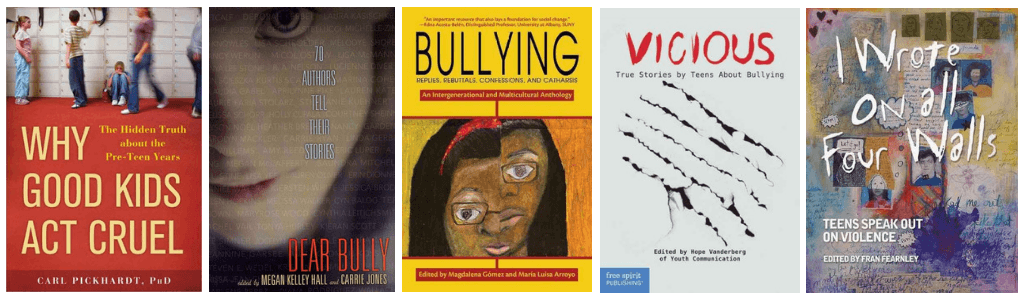
Bullying: Replies, Rebuttals, Confessions, and Catharsis: an Intergenerational and Multicultural Anthology, edited by Magdalena Gómez and María Luisa Arroyo (2012) – Springfield community leaders and activists Gómez and Arroyo worked with children, teenagers, and parents—both the victims and the bullies—to put together this searing anthology of original essays, poetry, plays, and commentary on how bullying has affected their lives.
Cyberbullying, by Lauri S. Freidman (2011) – Explores the issues surrounding cyberbullying–bullying through the Internet–by placing opinions from a wide range of sources in a pro/con format.
Cyber Bullying: Protecting Kids and Adults from Online Bullies, by Samuel C McQuade (2009) – Before the advent of the widespread use of the internet, bullying was confined to school grounds, classrooms, and backyards. Now, the virulence of bullying has taken on new meaning, as bullies take to the web to intimidate, harass, embarrass, and offend others. Through email, cell phones, text messaging, and social networking sites, bullies can carry out their bullying in many cases without ever having to confront their victims, and often without consequence.
Dear Bully: Seventy Authors Tell Their Stories, edited by Carrie Jones and Megan Kelley Hall (2011) –A timely and moving collection of personal stories about bullying from authors as varied as Lauren Kate, Jon Scieszka, Alyson Nöel, Lauren Oliver, Mo Willems and many others.
Girls against Girls: Why We are Mean to Each Other and How We Can Change, by Bonnie Burton (2009) – This guide for teenage girls explains why girls can sometimes be mean to each other, what to do if you are a victim of bullying, and the importance of treating other girls with respect.
Hey, Back Off!: Tips for Stopping Teen Harassment, by Jennie Withers with Phyllis Hendrickson (2011) – Offers tips, strategies, and explanations about what harassment is; discusses how the behavior originates from personality types; and examines how to deal with the harassers.
I Have Been Cyberbullied, Now What?, by Caitie McAneney (2016)
Coverage includes the many faces of cyberbullying, consequences of cyberbullying, rights and laws, and surviving cyberbullying.
It Gets Better: Coming out, Overcoming Bullying, and Creating a Life Worth Living, by Dan Savage and Terry Miller (2015) –Authors and public figures share their stories about being LGBT teens and dealing with bullying and other hardships.
I Wrote on All Four Walls: Teens Speak Out on Violence, edited by Fran Fearnley (2004) – Nine teens share their experiences with violence and bullying.
Letters to a Bullied Girl: Messages of Healing and Hope, by Olivia Gardner with Emily and Sarah Buder (2008) –Draws on the correspondence between an epileptic victim of bullying and a pair of sisters who started a letter campaign on her behalf, in a volume that presents more than one hundred letters of encouragement received by the author.
Life at School and in the Community (Teens: Being Gay, Lesbian, Bisexual, or Transgender Series), by Richard Worth (2010) – Strategies for coming out to ones friends, interacting with school personnel, and dealing with bullies. Advice is also given on how to organize groups such as gay-straight alliances.
Masculinity, Bullying, and Aggression: a Guy’s Guide, by Sam Navarre (2012) – Explores the best and worst ways to handle aggression, the facts on bullying and cyberbullying, and how best to handle anger in everyday situations.
The Survival Guide to Bullying: Written by a Teen, by Aija Mayrock (2015) – The Survival Guide to Bullying covers everything from cyber bullying to how to deal with fear and how to create the life you dream of having. From inspiring “roems” (rap poems), survival tips, personal stories, and quick quizzes, this book will light the way to a brighter future.
Surviving Bullies and Mean Teens, by Mary P. Donahue, Ph.D. (2018) –
This book explains how bullying happens and offers solutions for teens to get through it safely. They’ll be given tips and strategies designed to help them make healthy choices, leading to a happier life, minus the bullies.
Teen Cyberbullying Investigated: Where Do Your Rights End and Consequences Begin?, by Tom Jacobs (2010) –Presents a collection of landmark court cases involving teens and charges of cyberbullying–including sending threatening emails, spreading hateful comments on blogs and sending threatening messages using a false identity–urging readers to think about how the computer can change their lives and hurt others.
Understanding Girl Bullying and What to Do about It : Strategies to Help Heal the Divide, by Julaine E. Field, et al. (2009) –This book covers the causes and characteristics of girl bullying; outlines assessment, prevention, and intervention methods; and provides an original 10-session curriculum for small groups. (Annotation from Amazon.com)
Vicious: True Stories by Teens about Bullying, edited by Hope Vanderberg (2012) –Essays by teens address bullying: physical, verbal, relational, and cyber. These stories will appeal to readers because the cruelty and hurt are unmistakably real—and the reactions of the writers are sometimes cringe-worthy, often admirable, and always believable.
We Want You to Know: Kids Talk About Bullying, by Deborah Ellis (2010) –
Presents interviews with students who have been bullied, as they describe their experiences with peers, parents, teachers, and school administrators, along with advice on the best methods that can be used to stop bullying behavior.
Why Good Kids Act Cruel : The Hidden Truth about the Pre-teen Years, by Carl E Pickhardt (2010) –Why Good Kids Act Cruel is the first book to give parents the tools they need to understand why cruelty happens at this age and how to help their child through this difficult stage. This highly informative and useful book explains the psychology of early adolescent change, the short and long term effects of social cruelty, what parents can do, what the school can do, and much more.
Words Wound : Delete Cyberbullying and Make Kindness Go Viral, by Justin W. Patchin and Sameer Hinduja (2013) –Written by experts in cyberbullying prevention and reviewed by teens, this book provides strategies for kids who are being bullied online, as well as for those who have taken part in bullying others. It also presents ways for teens to make their schools and their communities kinder places that are free from online cruelty. This book gives teens the tools they need to keep themselves and others safe.
FICTION
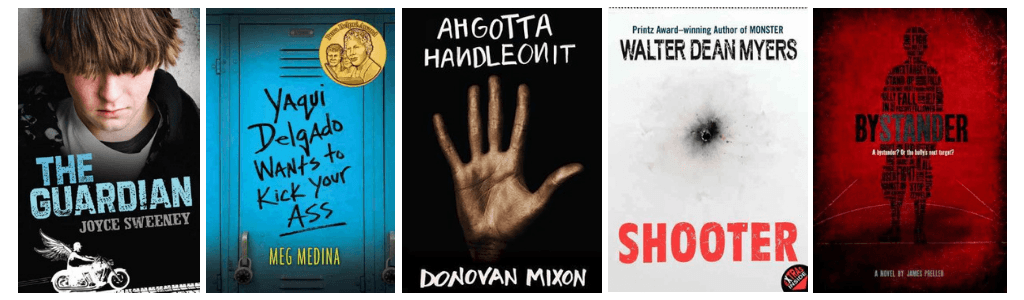
Ahgottahandleonit, by Donovan Mixon (2017) – Tim’s a dyslexic black kid on the mean streets of Newark. He wants to do what is right, but anger boils deep inside him. Despite everything, Tim wants his life to matter.
Avengers: No More Bullying, by various authors (2015) – The Avengers have always stood up for those who cannot stand up for themselves, but this time they’re in for a bombastic adventure of the highest order! Swing along with Spidey and a gathering of his amazing friends as they take on this important social issue in the inimitable Mighty Marvel Manner! Featuring guest stars from across the Marvel Universe, including Thor, Hercules, Daredevil and the Guardians of the Galaxy!
Backlash, by Sarah Darer Littman (2015) – When Christian, a boy she knows only through Facebook, posts a lot of nasty comments on her page, fifteen-year-old Lara tries to kill herself–but that is only the beginning of the backlash for her sister, Sydney; her former friend Bree; and her classmates.
The Bully (Bluford Series), by Paul Langan (2002) –Darrell Mercer, a 9th grader at Bluford, is at the center of this story. Darrell and his mother move to the Bluford area in the middle of the school year. Physically smaller than his peers, Darrell quickly becomes a target for Tyray Hobbs, the freshman class bully.
By the Time You Read This, I’ll Be Dead, by Julie Anne Peters (2010)
High school student Daelyn Rice, who has been bullied throughout her school career and has more than once attempted suicide, again makes plans to kill herself, in spite of the persistent attempts of an unusual boy to draw her out.
Bystander, by James Preller (2009) – Thirteen-year-old Eric discovers there are consequences to not standing by and watching as the bully at his new school hurts people, but although school officials are aware of the problem, Eric may be the one with a solution.
Cracked, by K.M. Walton (2012) – A teen takes a bottle of pills and lands in the psych ward with the bully who drove him to attempt suicide in this gripping novel.
Crossing Lines, by Paul Volponi (2011) –High school senior Adonis struggles to do the right thing when his fellow football players escalate their bullying of a new classmate, Alan, who is transgender.
A Cut Too Far, by Herman Brown (2015) – Chace has been bullied for years by Ivan, first for his facial deformity then for his mother’s Iranian-American boyfriend, but when he decides to pay back Ivan’s Internet attacks with a cyberthreat of his own, he faces suspension from school–and worse.
The Dark Days of Hamburger Halpin, by Josh Berk (2010) – When Will Halpin transfers from his all-deaf school into a mainstream Pennsylvania high school, he faces discrimination and bullying, but still manages to solve a mystery surrounding the death of a popular football player in his class.
Dog Sense, by Sneed B Collard (2008) – After he and his mother move from California to Montana to live with his grandfather, thirteen-year-old Guy gradually adjusts to the unfamiliar surroundings, makes a friend, and learns to deal with a bully, with the help of his Frisbee-catching dog.
Everybody Sees the Ants, by A.S. King (2012) –Experiencing vivid dreams about meeting his long-lost POW/MIA grandfather, Lucky Linderman struggles to fit into a home life marked by a distant father, a weary mother and a cruel bully who compromises Lucky’s grasp on reality.
Fat Angie, by E. E. Charlton-Trujillo (2015) – Her sister was captured in Iraq, she’s the resident laughingstock at school, and her therapist tells her to count instead of eat. Can a daring new girl in her life really change anything?
Freak Show, by James St. James (2007) – Billy, a budding drag queen, survives bullying that would reduce most people to quivering jelly — and falls in love with a football player.
The Guardian, by Joyce Sweeney (2009) – When thirteen-year-old Hunter, struggling to deal with a harsh, money-grubbing foster mother, three challenging foster sisters, and a school bully, returns to his childhood faith and prays to St. Gabriel, he instantly becomes aware that he does, indeed, have a guardian.
Jumped, by Rita Williams-Garcia (2009) –The lives of Leticia, Dominique, and Trina are irrevocably intertwined through the course of one day in an urban high school after Leticia overhears Dominique’s plans to beat up Trina and must decide whether or not to get involved.
None of the Above, by I. W. Gregorio (2015) – A groundbreaking story about a teenage girl who discovers she was born intersex… and what happens when her secret is revealed to the entire school.
Out of Sight, Out of Mind (Gifted Series, Vol. 1), by Marilyn Kaye (2009) –
Amanda Beeson is Queen Bee at Meadowbrook Middle School. If you’re not friends with Amanda, you’re nobody. But one morning gorgeous, popular Amanda looks in the mirror and sees a very diifferent face staring back at her. The Queen Bee is about to get a taste of life in someone else’s shoes.
Poison Ivy, by Amy Goldman Koss (2006) – In a government class three popular girls undergo a mock trial for their ruthless bullying of a classmate.
Revelación, by Patricia Murdoch (2008) – For most of her life, Julie felt powerless whenever Dana entered her space, whether it was inside or outside school. Dana thrived on making Julie feel less than human by subjecting her to vicious verbal comments that went beyond the normal high school taunts. Then it all changed when Julie sneaked into her brother’s backpack and downloads photos of a sleazy party where Dana exposed more than personality. Now Julie has to decide how far she’ll go to get even with all the nastiness that Dana has dished out to her. Translation of Exposure by Patricia Murdoch.
Scrawl, by Mark Shulman (2010) – When eighth-grade bully Tod and his friends get caught committing a crime on school property, his penalty, staying after school and writing in a journal, reveals aspects of himself that he prefers to keep hidden.
Screenshot, by Donna Cooner (2018) – Sixteen-year-old Skye Matthews is always careful with her social media accounts, but when her friend Asha posts an embarrassing video of Skye at a sleepover her perfect reputation and her dream of a summer internship with the Colorado senator is endangered–someone took a screenshot before the video was deleted and is threatening to share the photo online, unless Skye does whatever they ask.
Shooter, by Walter Dean Myers (2004) – When his friend goes on a shooting rampage at school, misfit Cameron has to rethink his views on his life and his place in the world, in a powerful tale told through interviews, diary excerpts, and newspaper articles.
A Silent Voice, by Yoshitoki Ōima (2015) – When a grade school student with impaired hearing is bullied mercilessly, she transfers to another school. Years later, one of her former tormentors sets out to make amends.
Some Girls Are, by Courtney Summers (2010) – Regina, a high school senior in the popular–and feared–crowd, suddenly falls out of favor and becomes the object of the same sort of vicious bullying that she used to inflict on others, until she finds solace with one of her former victims.
Speak, by Laurie Halse Anderson (1999) – A traumatic event near the end of the summer has a devastating effect on Melinda’s freshman year in high school, as classmates torment her through rumors and exclude her from clubs and gatherings.
Thirteen Reasons Why, by Jay Asher (2007) – Por Trece Razones: una Novela (Spanish) – When high school student Clay Jenkins receives a box in the mail containing thirteen cassette tapes recorded by his classmate Hannah, who committed suicide, he spends a bewildering and heartbreaking night crisscrossing their town, listening to Hannah’s voice recounting the events leading up to her death.
This Is What I Did, by Ann Dee Ellis (2009) –Bullied because of an incident in his past, eighth-grader Logan is unhappy at his new school and has difficulty relating to others until he meets a quirky girl and a counselor who believe in him.
Twisted, by Laurie Halse Anderson (2007) – After finally getting noticed by someone other than school bullies and his ever-angry father, seventeen-year-old Tyler enjoys his tough new reputation and the attentions of a popular girl, but when life starts to go bad again, he must choose between transforming himself or giving in to his destructive thoughts.
Yaqui Delgado Wants to Kick Your Ass, by Meg Medina (2015) –Yaqui Delgado Quiere Darte una Paliza (Spanish) – A Latina girl is targeted at her new school and learns to stand up for herself.
Updated – September 2018

 June 5, 2020